
Quick verdict: my GeForce Now Ultimate review in one line? It’s worth it for me, and I’m still paying for it after my trial month. On my connection it streams at 4K and 120 FPS, I never wait for a machine, and I’ve stopped juggling storage and updates. It’s great for single player, strategy and gacha games. It’s not for serious competitive shooters, because cloud gaming always adds some input lag.
Last updated: October 2026
I signed up for GeForce Now Ultimate (the top tier) to see if cloud gaming could replace some of my local PC gaming. A month later I’m keeping it. This GeForce Now Ultimate review covers what it’s actually like to use day to day in Australia, the bits that annoy me, and how fast your internet really needs to be.
GeForce Now Ultimate review: the key facts for Australia
In Australia, GeForce Now is run by Pentanet as GeForce NOW Powered by CloudGG, so pricing and limits are a little different to the US.
| Ultimate (Australia) | |
|---|---|
| Price | A$32.99 a month, or A$165 every 6 months (A$27.50 a month) |
| Max quality | Up to 4K at 120 FPS, or 1080p at 240 FPS |
| Session length | Up to 8 hours per session |
| Monthly playtime | 100 hours, with up to 10 unused hours rolling over |
| Internet NVIDIA asks for | 35 Mbps for 1440p at 120 FPS, 45 Mbps for 4K at 120 FPS, under 40 ms ping recommended |
| Wait times | I haven’t had to queue once on Ultimate |
My setup and connection
My internet is about 200 Mbps down and 40 Mbps up, and I’m close to one of the Australian GeForce Now servers. That second part matters more than people think. Cloud gaming is all about how far the signal has to travel, so being near a local server is a big reason it feels good for me.
With that, my stream is set to 3840 x 2160 at 120 FPS and it holds up. Outside the odd stutter here and there, it just works. I play with keyboard and mouse and it feels good. I haven’t tried controller support yet.
My GeForce Now Ultimate streaming settings
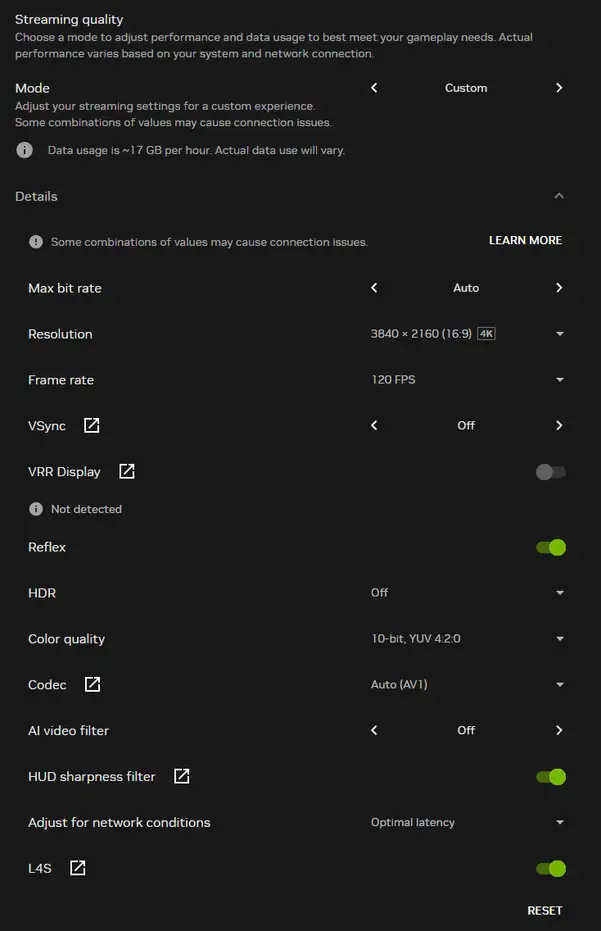
These are the settings I actually use day to day. I haven’t spent ages tweaking them, this is just what works on my connection.
| Setting | Mine | What it does |
|---|---|---|
| Resolution | 3840 x 2160 (4K) | The resolution GeForce Now streams at. Set it to match your screen. |
| Frame rate | 120 FPS | How many frames per second get streamed. |
| Max bit rate | Auto | Lets GeForce Now pick how much data to send based on your connection. |
| Codec | Auto (AV1) | AV1 gives better picture quality for the same bandwidth, if your PC can decode it. |
| Colour quality | 10-bit, YUV 4:2:0 | Smoother colour gradients than 8-bit. |
| Reflex | On | NVIDIA tech that cuts input lag in supported games. |
| L4S | On | A newer network feature that helps keep latency low when your connection is busy. |
| Adjust for network conditions | Optimal latency | Prioritises responsiveness over picture quality when the connection dips. |
| VSync / HDR / AI video filter | Off | Off keeps things simple and avoids extra lag. |
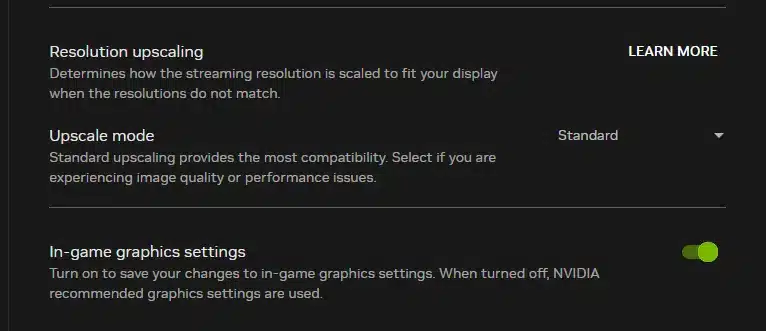
Two more settings further down: I leave Upscale mode on Standard, and I turn on In-game graphics settings so any graphics changes I make inside a game are saved for next time. With it off, NVIDIA picks the graphics settings for you.
What I like: no more storage and update juggling
This is the part that won me over. Games are huge now, and I was always deleting one thing to make room for another, then waiting on updates before I could play. With GeForce Now the games live on their servers and they’re already updated. I click play and I’m in.
On top of that, the game runs on NVIDIA’s hardware rather than mine, so my own PC’s specs barely matter.
Input lag: which games it suits (and which it doesn’t)
There is some input lag. That’s unavoidable with cloud gaming, because every click has to go to the server and the picture has to come back. Hopefully the tech gets good enough that it disappears one day. For now, though, it’s still there.
- Feels great: strategy and city builders like Manor Lords, and gacha games. The small delay just doesn’t matter in these.
- Fine for most people: single player action games, as long as you’re close to a server.
- Not for me: competitive shooters like CS. If you take ranked seriously, the extra delay is noticeable. Casual games are okay, competitive play isn’t really possible.
Bonus: I run Lossless Scaling on top of GeForce Now
This is my favourite trick. Since the game runs on NVIDIA’s servers, my own GPU has loads of headroom, so I run Lossless Scaling on the GeForce Now window. I set the in-game graphics to look nice, even if that lands somewhere between 60 and 120 FPS, then let Lossless Scaling push it to 144 FPS with my usual settings. I get graphics I couldn’t run locally at a frame rate that feels smooth.
The trade off is a little extra input lag on top of the cloud gaming lag. That’s fine for everything I play on GeForce Now, since I don’t use it for shooters or competitive games anyway.
The annoying bits about GeForce Now Ultimate
Logging in to non-Steam games
Steam games are smooth. However, games with their own launchers are a bit more of a hassle, because you have to log in to them on GeForce Now. For me that’s mostly gacha games like Zenless Zone Zero, Honkai: Star Rail, Neverness to Everness and Arknights: Endfield. Not a deal breaker, just a few extra steps.
Not every game is supported
I wish the library was just every game. It’s a big list, but if I’m paying for the top tier it’d be nice to commit fully to the cloud. Right now I still need to keep a few things installed locally, so it’s not a full replacement for a gaming PC yet.
The 100 hour monthly limit
Ultimate gives you 100 hours a month, and up to 10 unused hours roll over. I haven’t hit it, but if you game more than about three hours every day, you will. I also haven’t done an 8 hour session yet, so I haven’t been kicked by the session limit either.
How fast does your internet need to be for GeForce Now?
NVIDIA says 35 Mbps for 1440p at 120 FPS and 45 Mbps for 4K at 120 FPS. In practice you want a bit of headroom above that, and the connection matters as much as the speed.
My own comparison: on my home internet (about 200 Mbps) my 4K 120 FPS settings hold up fine. On another network doing roughly 45 to 50 Mbps over 5 GHz Wi-Fi, it could only manage about 720p. Same account, same games, much worse picture. So if you’re close to the minimum, use a cable instead of Wi-Fi if you can, and don’t expect the top settings.
GeForce Now Ultimate review: quick answers
Is GeForce Now worth it in Australia?
If you’re close to a server and have decent NBN, yes. It’s a lot cheaper than buying a high-end PC to play big new games at high settings. If your internet is on the slower side, the cheaper Performance tier (up to 1440p) is worth a look first.
Can you play competitive shooters on GeForce Now?
Casually, yes. Seriously, not really. The input lag is small but it’s there, and in ranked shooters every millisecond counts.
Do you have to wait in a queue on GeForce Now Ultimate?
Not in my experience. I haven’t waited for a machine once on Ultimate.
Does GeForce Now work with keyboard and mouse?
Yes, and it works well. That’s how I play everything.
How much data does GeForce Now use?
At my 4K 120 FPS settings the app estimates about 17 GB per hour. That adds up fast: using all 100 hours in a month would be around 1.7 TB. Fine on an unlimited NBN plan, but check your plan if you have a data cap. Lower resolutions use a lot less.
Is the 100 hour limit a problem?
For most people, no. 100 hours is a bit over 3 hours a day. Heavy gamers will feel it.
GeForce Now Ultimate review: final verdict
My GeForce Now Ultimate review ends where it started: it’s worth it for me, and the fact I’m still paying after the first month says it all. The convenience is the real win: no downloads, no updates, no storage juggling, and great quality as long as your internet and server distance are good. The input lag rules out competitive shooters, and I’d love the library to cover every game, but for everything else I play it’s been great.
If you’d rather squeeze more frames out of your own PC instead, check out my Lossless Scaling review.
Using GeForce Now in Australia too? Let me know how it runs for you in the comments. For more tech content click here.